
AI Summary
What is crawlability? Crawlability is the measure of how effectively search engine bots can discover, access, and process the pages on your site. It covers the entire journey from Googlebot discovering a URL through internal links or the sitemap to successfully downloading the page content and passing it to the indexing system. If Google cannot complete that journey, the page does not exist in search results regardless of its quality.
What it is and who it is for: Crawlability is the first of the five disciplines in the 5C Framework at Star Diamond SEO. This page is for site owners and SEO practitioners who need to understand how crawl infrastructure affects search visibility, what the common crawlability failures are, how to diagnose them, and how crawlability connects to the other four disciplines: content, cadence, calibration, and credibility.
The rule: Crawlability is not an optimization. It is infrastructure. A page that Google cannot crawl cannot be indexed. A page that cannot be indexed cannot rank. Every dollar spent on content, links, and on-page optimization for a page that is not crawlable is a dollar wasted. Fix the crawl layer first. Build everything else on top of it.
If Googlebot Cannot Find It, Nothing Else Matters
Crawlability is the most boring of the five Cs and the one that quietly destroys the most sites. You can have brilliant content, perfect cadence, surgical calibration, and earned credibility, and none of it matters if Google cannot find your pages, fetch them successfully, and process them into the index. Crawlability is the foundation the other four Cs stand on. When the foundation has cracks, everything built on top of it underperforms and nobody can figure out why.
Most site owners never think about crawlability until something breaks visibly. A page disappears from search results. A new article never gets indexed. Traffic drops overnight and the rankings report shows nothing changed. The problem is rarely the content or the backlinks. The problem is usually something in the crawl layer that prevented Google from seeing the content at all: a misconfigured robots.txt, a page buried six clicks deep in the site architecture, a server that responds too slowly for Googlebot to finish the crawl, or an internal linking structure that creates orphan pages invisible to the crawler.
Star Diamond SEO treats crawlability as infrastructure, not an afterthought. Every site we build or optimize gets a crawlability audit before any content strategy begins, because there is no point writing content that Google cannot find.
What Crawlability Actually Means
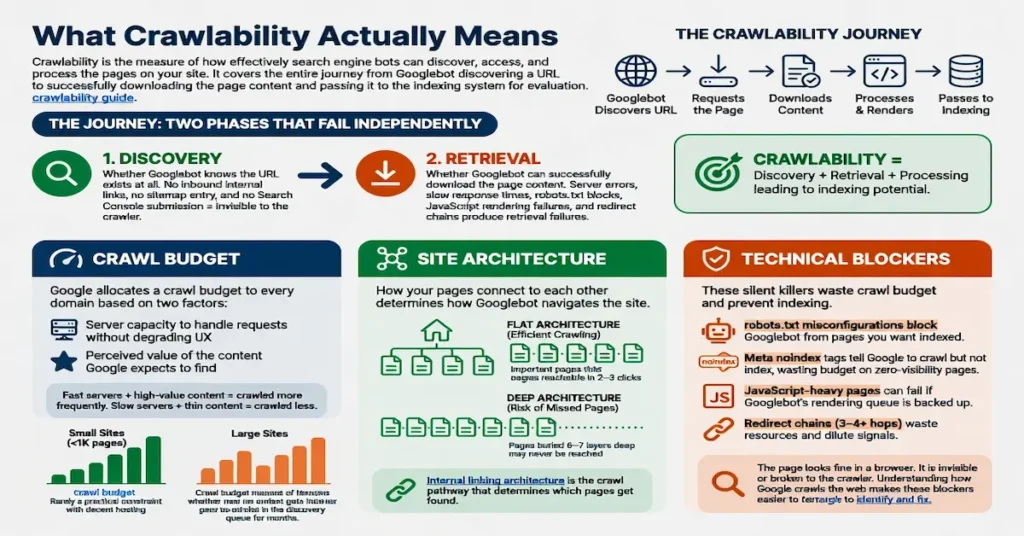
Crawlability is the measure of how effectively search engine bots can discover, access, and process the pages on your site. It covers the entire journey from Googlebot discovering a URL to successfully downloading the page content and passing it to the indexing system for evaluation. The crawlability guide covers the full technical breakdown of each phase.
The journey breaks into two phases that fail independently. Discovery is whether Googlebot knows the URL exists at all. A page with no inbound internal links, no sitemap entry, and no Search Console submission is invisible to the crawler regardless of how good the content is. Retrieval is whether Googlebot can successfully download the page content once it finds the URL. Server errors, slow response times, robots.txt blocks, JavaScript rendering failures, and redirect chains all produce retrieval failures where the URL was discovered but the content was never obtained.
Understanding how Google crawls the web makes the distinction between these two phases concrete. Discovery and retrieval are separate systems that fail for separate reasons, and diagnosing a crawlability problem requires knowing which phase is failing. A page stuck in “Discovered, currently not indexed” has a retrieval or quality problem. A page that does not appear in Search Console at all has a discovery problem.
Discovery: How Google Finds Your Pages
Google discovers new pages through three mechanisms: following internal links from pages it already knows, reading URLs listed in the XML sitemap, and following external links from other sites that point to your pages.
Internal links are the primary discovery mechanism and the one you control most directly. When Googlebot crawls a page on your site, it follows every link on that page. If your homepage links to your main category pages, and your category pages link to your articles, Googlebot follows that chain and discovers the articles. If an article has no internal links pointing to it from anywhere on the site, Googlebot has no link path to follow and the page becomes an orphan page that may never be crawled.
The XML sitemap is the secondary discovery mechanism. It is a direct list of URLs you want Google to know about. Googlebot checks the sitemap periodically and adds any new URLs to its crawl queue. The sitemap does not guarantee crawling or indexing. It guarantees that Google is aware the URL exists. Whether Google decides to crawl and index it depends on signals like content quality, internal linking, and the site’s overall crawl value.
External links from other sites serve as a third discovery path. When another site links to one of your pages, Googlebot can follow that link during its crawl of the other site and discover your URL. This is why backlinks serve a dual purpose: they pass authority and they create crawl discovery paths. A backlink to a new page can accelerate its discovery by days compared to waiting for Googlebot to find it through internal links or the sitemap alone.
The internal linking architecture is the crawl discovery system you build deliberately. Every page should be reachable within two or three clicks from the homepage. Every page should have multiple internal links pointing to it from contextually related pages. The architecture exists to serve both users and crawlers, and when it is built correctly, discovery is never the bottleneck.
Retrieval: How Google Downloads Your Content
Discovery gets Googlebot to the front door. Retrieval is whether it can get inside. Once Googlebot finds a URL, it sends an HTTP request to your server asking for the page content. The server’s response determines whether the retrieval succeeds.
A successful retrieval returns an HTTP 200 status code and the full HTML content of the page. Googlebot reads the HTML, follows any links on the page for further discovery, and passes the content to the indexing system for evaluation. If the content passes the quality and relevance thresholds, it gets added to the index and becomes eligible for ranking.
Retrieval failures come in several forms. A 404 (Not Found) response means the URL does not exist on the server. A 5xx (Server Error) response means the server failed to process the request. A 301 or 302 redirect means the URL has moved, and Googlebot follows the redirect to the new location, spending crawl resources on the hop. A robots.txt block means the server explicitly told Googlebot not to crawl the URL. Each of these is a different type of crawl error with a different diagnosis and a different fix.
Server response time is a retrieval factor that affects how much Googlebot can crawl in a single session. If the server takes 2 seconds to respond to each request, Googlebot can crawl fewer pages per visit than if the server responds in 200 milliseconds. For large sites, this difference determines whether new content gets discovered and indexed within days or sits in the queue for weeks. For smaller sites, server speed still affects the frequency and completeness of each crawl visit.
p>
Crawl Budget and How Google Allocates It
Google allocates a crawl budget to every domain based on two factors: the server’s capacity to handle crawl requests without degrading the user experience, and the perceived value of the content Google expects to find. Sites with fast servers and high-value content get crawled more frequently. Sites with slow servers and thin content get crawled less.
For smaller sites with fewer than a thousand pages and decent hosting, crawl budget is rarely a practical constraint. Google can crawl the entire site in a single session. For larger sites with tens of thousands of pages, crawl budget management becomes critical. If the crawl budget is consumed by low-value pages (paginated archives, tag pages, faceted navigation URLs, duplicate parameter URLs), the high-value content pages may not get crawled frequently enough to maintain competitive freshness.
The levers that affect crawl budget are server response time (faster servers allow more pages per session), URL cleanliness (fewer junk URLs means more budget spent on real content), and content value (sites that consistently produce valuable content get increased crawl allocation over time). The crawl budget guide covers the full mechanics and optimization strategies.
Site Architecture and Crawl Depth
How your pages connect to each other determines how Googlebot navigates the site. A flat architecture where every important page is reachable within two or three clicks from the homepage gives the crawler efficient access to everything. A deep architecture where pages are buried behind six or seven navigation layers means Googlebot may never reach the deeper pages before its crawl budget runs out.
The content cluster strategy that Star Diamond SEO builds for every client doubles as a crawl architecture. Each cluster has a pillar page that links down to every supporting article, and every supporting article links back up to the pillar. This creates a two-click maximum depth within any cluster: homepage to pillar, pillar to article. Googlebot can reach any article in the cluster through two link hops, and the bidirectional linking within the cluster means there are multiple crawl paths to every page.
Site architecture also affects how Google distributes PageRank internally. Pages closer to the homepage receive more internal PageRank because more link paths reach them. Pages buried deep in the architecture receive less because fewer paths reach them. The architecture that produces the best crawlability also produces the best internal authority distribution, which is why crawlability optimization and on-page optimization are not separate disciplines. They are the same work viewed from different angles.
Technical Blockers That Kill Crawlability
Robots.txt misconfigurations block Googlebot from pages you want indexed. A single disallow rule targeting the wrong directory can remove an entire section of the site from Google’s crawl. The robots.txt file is the most powerful crawlability control and the most dangerous when misconfigured. Always validate robots.txt changes against the live site before deploying them.
Meta noindex tags tell Google to crawl but not index the page, which wastes crawl budget on pages that produce no search visibility. Noindex is the correct directive for pages that should not appear in search results (admin pages, thank-you pages, staging content). It is a crawlability failure when applied to pages that should be indexed.
Redirect chains that bounce through three or four URLs before reaching the final destination waste crawl resources and dilute the link equity attached to each redirect hop. Old URL structures from site migrations, slug changes, and restructured categories are the most common sources of redirect chains. Most site owners do not realize they exist until a crawl audit reveals them.
Canonical tag conflicts occur when a page’s canonical tag points to a different URL than the one being crawled. Google has to decide which URL to trust, and the wrong decision can result in the preferred page being excluded from the index while the wrong version gets indexed. Canonical tags should point to the exact URL you want indexed, with matching protocol (https), subdomain (www vs non-www), and trailing slash conventions.
Each of these is a silent killer. The page looks fine in a browser. It is invisible or broken to the crawler. Understanding how Google crawls the web makes these blockers easier to identify and fix.
Common Crawlability Issues and How to Fix Them
The most common crawlability problems are predictable and follow patterns that appear across sites of every size and type.
Orphan Pages
Orphan pages are pages with zero inbound internal links. Googlebot cannot discover them through link crawling, which means they depend entirely on the sitemap for discovery. Even when discovered through the sitemap, orphan pages receive no internal PageRank and signal to Google that the site does not consider them important enough to link to. The fix is straightforward: add internal links from contextually relevant pages.
Crawl Errors
Crawl errors in Search Console indicate URLs where retrieval failed. A single 404 is a minor issue. Twenty 404 errors across pages that other pages link to is a crawlability crisis that bleeds authority from the entire internal linking structure. The fix depends on the error type: 404s need either a redirect to a relevant live page or removal of the internal links pointing to them. 5xx errors need server-side investigation. Redirect errors need chain cleanup.
Slow Server Response
Server response times consistently above 500ms indicate a hosting constraint that affects how much Google can crawl per session. Shared hosting with overloaded servers is the most common cause. The fix is server-side caching (page caching and object caching reduce the processing needed for each request), CDN implementation (Cloudflare or similar services reduce latency for geographic distribution), or hosting upgrade (a dedicated VPS or managed WordPress host provides consistent resources).
Bloated URL Space
WordPress sites commonly generate thousands of low-value URLs through tag archives, date archives, author archives, paginated category pages, and parameter-based URLs. These pages consume crawl budget without providing search value. The fix is noindexing or removing the URL generation for archive types the site does not need, and ensuring the sitemap only contains URLs that should be indexed.
JavaScript Rendering and Crawlability
JavaScript-heavy sites face a unique crawlability challenge. Googlebot processes JavaScript in two phases: an initial HTML crawl that captures the raw HTML source, and a rendering phase where Google executes the JavaScript to see the final page content. The rendering phase is resource-intensive and runs on a separate queue, which means there can be a significant delay between when Google crawls the HTML and when it renders the JavaScript.
Pages that depend on JavaScript to display their primary content risk having Google index the unrendered version, which may contain little or no visible text. This is particularly common with single-page applications (SPAs) built on React, Angular, or Vue that render content client-side. The content exists in the JavaScript bundle but is not present in the raw HTML that Google sees on the initial crawl.
The fixes for JavaScript crawlability include server-side rendering (SSR), which generates the full HTML on the server before sending it to the browser and to Googlebot; pre-rendering, which generates static HTML snapshots for specific URLs that crawlers receive instead of the JavaScript-dependent version; and dynamic rendering, which serves pre-rendered HTML to crawlers while serving the JavaScript version to regular browsers.
For most WordPress sites, JavaScript rendering is not a primary crawlability concern because WordPress generates server-side HTML by default. The risk appears when themes or plugins inject critical content through JavaScript rather than including it in the HTML source. Checking what Googlebot sees versus what the browser sees through the URL Inspection tool in Search Console identifies these discrepancies.
What We Fix
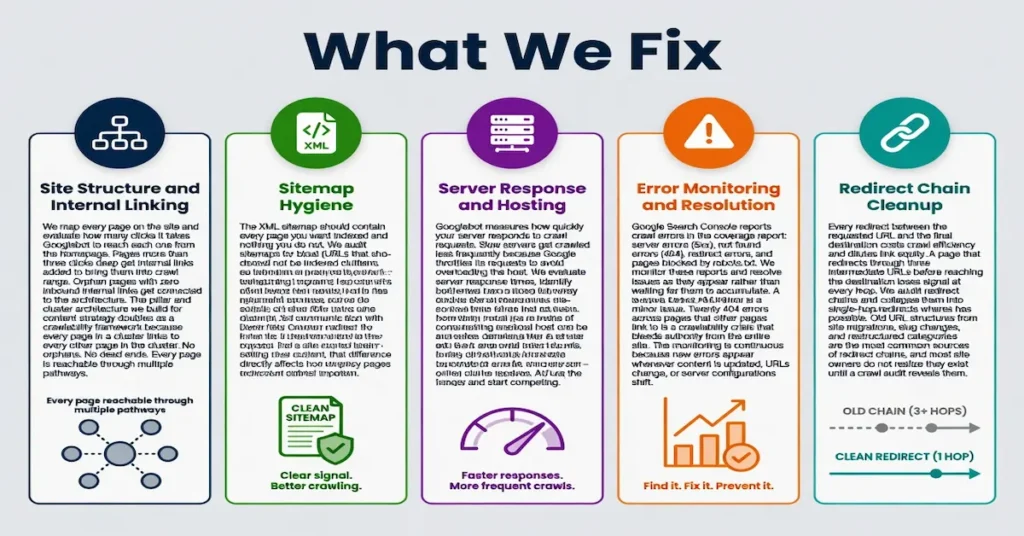
Site Structure and Internal Linking
We map every page on the site and evaluate how many clicks it takes Googlebot to reach each one from the homepage. Pages more than three clicks deep get internal links added to bring them into crawl range. Orphan pages with zero inbound internal links get connected to the architecture. The pillar and cluster architecture we build for content strategy doubles as a crawlability framework because every page in a cluster links to every other page in the cluster. No orphans. No dead ends. Every page is reachable through multiple pathways.
Sitemap Hygiene
The XML sitemap should contain every page you want indexed and nothing you do not. We audit sitemaps for bloat (URLs that should not be indexed cluttering the sitemap and wasting crawl budget), for missing pages (content that was published but never added to the sitemap), and for accuracy (URLs that return 404s, redirects, or noindex tags despite being listed in the sitemap). A clean sitemap is a direct communication with Googlebot about what you consider important. A messy sitemap is noise that dilutes that communication.
Server Response and Hosting
Googlebot measures how quickly your server responds to crawl requests. Slow servers get crawled less frequently because Google throttles its requests to avoid overloading the host. We evaluate server response times, identify hosting bottlenecks, and recommend upgrades when the hosting infrastructure is the constraint on crawl frequency. The difference between a $5/month shared host and a $30/month managed host can be the difference between daily crawls and weekly crawls. The Core Web Vitals assessment that affects ranking depends partly on the same server performance that determines crawl efficiency.
Error Monitoring and Resolution
Google Search Console reports crawl errors in the coverage report: server errors (5xx), not found errors (404), redirect errors, and pages blocked by robots.txt. We monitor these reports and resolve issues as they appear rather than waiting for them to accumulate. The monitoring is continuous because new errors appear whenever content is updated, URLs change, or server configurations shift.
Redirect Chain Cleanup
Every redirect between the requested URL and the final destination costs crawl efficiency and dilutes link equity. A page that redirects through three intermediate URLs before reaching the destination loses signal at every hop. We audit redirect chains and collapse them into single-hop redirects where possible. Old URL structures from site migrations, slug changes, and restructured categories are the most common sources of redirect chains.
What We Track
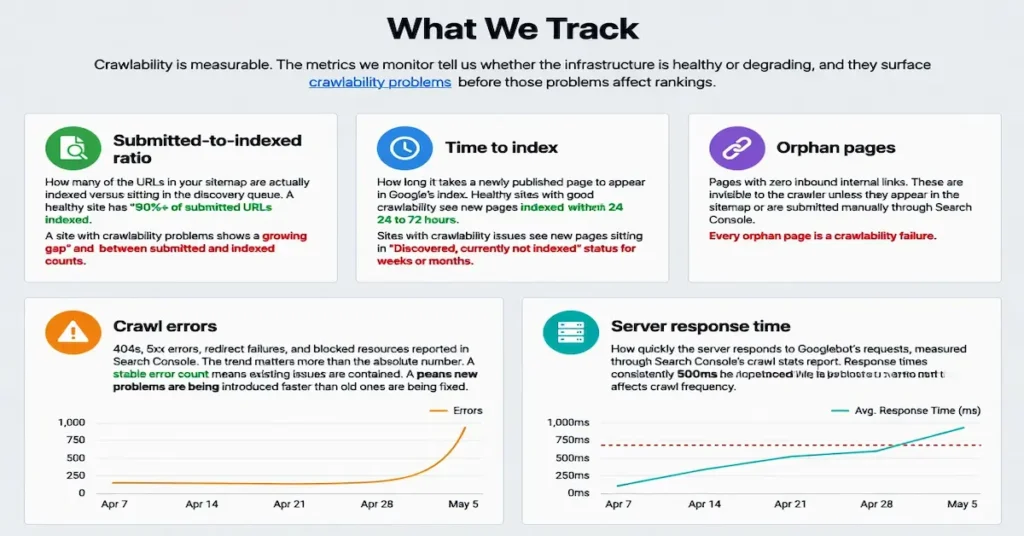
Crawlability is measurable. The metrics we monitor tell us whether the infrastructure is healthy or degrading, and they surface crawlability problems before those problems affect rankings.
Submitted-to-indexed ratio: How many of the URLs in your sitemap are actually indexed versus sitting in the discovery queue. A healthy site has 90%+ of submitted URLs indexed. A site with crawlability problems shows a growing gap between submitted and indexed counts.
Time to index: How long it takes a newly published page to appear in Google’s index. Healthy sites with good crawlability see new pages indexed within 24 to 72 hours. Sites with crawlability issues see new pages sitting in “Discovered, currently not indexed” status for weeks or months.
Orphan pages: Pages with zero inbound internal links. Every orphan page is a crawlability failure that should be resolved by adding internal links from relevant content.
Crawl errors: 404s, 5xx errors, redirect failures, and blocked resources reported in Search Console. The trend matters more than the absolute number. A stable error count means existing issues are contained. A growing error count means new problems are being introduced faster than old ones are being fixed.
Server response time: How quickly the server responds to Googlebot’s requests, measured through Search Console’s crawl stats report. Response times consistently above 500ms indicate a hosting constraint that affects crawl frequency.
How Crawlability Connects to the Other 4 Cs
Crawlability is the infrastructure layer that every other C depends on to function.
Content is what Googlebot is trying to find. Every article, every pillar page, every tier in a cluster needs to be crawlable for the content investment to produce results. The best content on the internet produces zero rankings if the crawler cannot reach it.
Cadence creates fresh crawl demand. When you publish consistently, Googlebot learns to return frequently because it expects new content. Irregular publishing teaches Googlebot that your site rarely changes, which reduces crawl frequency and delays the indexing of new content when you do publish.
Calibration depends on the page being indexed before any on-page optimization can take effect. A perfectly calibrated page that sits in “Discovered, currently not indexed” for three months has three months of zero return on the optimization investment. Crawlability determines how quickly calibration produces results.
Credibility compounds through the link signals that point to your pages. But if the pages those links point to are not crawlable, Google cannot follow the links and the authority they carry never reaches your site. A backlink to a 404 page is a wasted backlink. Crawlability ensures the credibility signals that other sites send actually arrive.
Crawlability is the gear that connects every other gear to the engine. It does not produce rankings by itself. It makes rankings possible for everything else.
Crawlability in YMYL Industries
Crawlability carries additional weight in YMYL verticals because Google crawls and re-evaluates YMYL content more frequently than general informational content. Industries like healthcare, dental, law firm, and real estate produce content that affects people’s health, financial stability, and legal standing. Google’s quality systems re-crawl and re-evaluate these pages more aggressively because outdated or inaccurate YMYL content poses real-world risk.
The implication is that YMYL sites benefit more from crawlability optimization than general sites. A YMYL site with clean architecture, fast server response, and no crawl errors gets re-crawled frequently, which means content updates, E-E-A-T improvements, and freshness signals are picked up quickly. A YMYL site with crawlability problems gets re-crawled less often, which means quality improvements take longer to register and ranking recovery after algorithm updates is delayed.
Every YMYL site should treat crawlability as priority-one infrastructure. The E-E-A-T signals that YMYL sites invest heavily in only affect rankings if Google can crawl the pages those signals live on.
Crawlability and AI Search
The crawl layer is no longer just about Google. AI search platforms including ChatGPT, Perplexity, Gemini, and others operate their own crawlers that visit websites to build and update the knowledge bases that power their responses. A site that is crawlable by Googlebot is generally crawlable by AI crawlers as well, but the robots.txt directives may differ between them.
Some site owners have blocked AI crawlers through robots.txt directives (GPTBot, PerplexityBot, CCBot) without realizing the consequence: their content becomes invisible to AI-generated answers. For businesses competing for visibility in AI search, blocking these crawlers removes the site from consideration entirely.
The crawlability decisions that support AI search visibility are the same decisions that support traditional SEO: clean architecture, fast server response, structured content with clear headings, and no unnecessary crawl barriers. The AI search visibility guide covers the full strategy for earning presence in AI-generated responses, and crawlability is the prerequisite that makes everything else in that strategy possible.
What We Offer
Crawlability audits through our technical SEO service that evaluate your site’s architecture, sitemap configuration, robots.txt, server response times, redirect chains, and error inventory. The audit produces a prioritized fix list organized by impact: what is actively blocking rankings, what is degrading performance, and what is a cleanup item that can wait.
Technical fixes implemented directly in your WordPress environment. We do not hand you a report and wish you luck. We fix the robots.txt, clean up the redirects, restructure the internal links, optimize the sitemap, and verify the fixes in Search Console. The audit and the remediation are one engagement, not two.
Ongoing monitoring as part of the 5C Framework retainer. Crawlability is not a one-time fix. New errors appear as content is published, URLs change, and the site evolves. Continuous monitoring catches issues before they affect rankings rather than after the damage is done.
Start with a free GSC audit. We will run your site through Search Console and Ahrefs, identify every crawl issue that is currently blocking or degrading your search visibility, and show you exactly what needs to be fixed. No pressure. No jargon. A clear list of problems and a clear plan to solve them. Contact us to get started.
FAQ
What is crawlability in SEO?
Crawlability is the measure of how effectively search engine bots can discover, access, and process the pages on your website. It determines whether Google can find your pages through internal links and the sitemap, successfully download the content, and pass it to the indexing system. A page that is not crawlable cannot be indexed and cannot rank, regardless of its content quality or backlink profile.
What are the most common crawlability problems?
The most common crawlability problems are orphan pages with no internal links pointing to them, robots.txt rules that block pages you want indexed, slow server response times that limit how many pages Google can crawl per session, redirect chains that waste crawl budget, and crawl errors (404s and 5xx responses) that prevent Google from accessing the content. Most of these are preventable through proper site architecture and regular crawl monitoring.
How do I check my site’s crawlability?
Google Search Console is the primary tool for checking crawlability. The Page Indexing report shows which pages are indexed, which are excluded, and why. The URL Inspection tool lets you check individual pages. The Crawl Stats report shows how frequently Google crawls your site and how quickly your server responds. For a more comprehensive audit, tools like Ahrefs Site Audit and Screaming Frog crawl the site from an external perspective and identify issues Google Search Console may not report.
Does crawl budget matter for small sites?
For sites with fewer than a thousand pages and reasonable hosting, crawl budget is rarely a practical constraint. Google can crawl the entire site in a single session. Crawl budget becomes important for larger sites with tens of thousands of pages, particularly when a significant portion of those pages are low-value (archives, tag pages, parameter URLs) that consume crawl resources without providing search value.
How long does it take Google to crawl a new page?
On a site with good crawlability, Google typically discovers and crawls new pages within a few hours to a few days after they are published, assuming they are linked from existing pages or submitted through the sitemap. Sites with crawlability problems or low crawl frequency may see delays of weeks or months. Submitting the URL through Search Console’s URL Inspection tool can accelerate the process for high-priority pages.
Can crawlability issues cause a traffic drop?
Yes. If a crawlability issue prevents Google from accessing pages that were previously indexed, those pages can be dropped from the index and disappear from search results. Common triggers include robots.txt changes that accidentally block important pages, server errors that persist long enough for Google to remove the pages from the index, and redirect misconfigurations that break the path to existing content. Monitoring crawl errors in Search Console catches these issues before they cause sustained traffic loss.
What is the difference between crawlability and indexability?
Crawlability is whether Google can access the page. Indexability is whether Google chooses to add the page to its index after crawling it. A page can be crawlable but not indexable if it has a noindex tag, if Google considers the content too thin or duplicate, or if the page fails quality thresholds. Both are required for a page to appear in search results: Google must be able to crawl it, and it must pass the indexing evaluation.